
SCREEN TIME: Why it’s Important
Both American Academy of Pediatrics and Canadian Paediatric Society recommend less that 2 hours of screen for young children. As kids grow up, they will be exposed to more screen time. Quality of screen time is also something to consider and balance as a parent.
Starts conversations today about what interests your child has when they are spending time on their devices.
Learn more via our blog post: Kids + Appropriate Screen Time = Better Sleep
FIRST SMARTPHONE = 11 YEARS OLD AVERAGE AGE
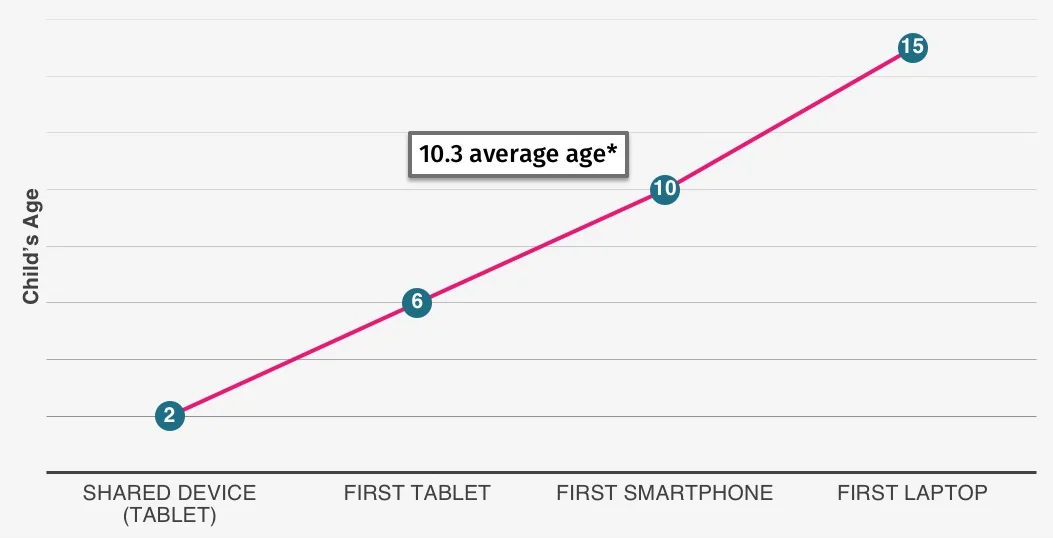
Kids are getting their first smartphones, on average, at the age of 10. We wouldn’t allow our kids to start riding their first bike without guidance and training wheels. Why should we treat a smartphone, which is a powerful mobile computer, differently?
Source: The average age at which children received their first phones was 11.6 years old
Consider comparing the capabilities of Android vs iOS devices when you are planning to use them with third-party parental controls. One has advantages over the other when it comes to managing your child’s device.
Compare Boomerang’s Android vs. iOS device features >
EVERY DAY SCREEN TIME TIPS
BEDROOMS & DEVICES DON’T MIX
Make a house rule of no smartphones in bedrooms. Need it as an alarm? Get a real alarm clock ?
CENTRAL SPOT FOR CHARGING
Create a shared charging station for all family devices—ideally outside bedrooms—to cut down on distractions.
DEVICE FREE DINNERS
We’re all busy running from activity to activity, so protect family time: make dinner a device-free zone.
CONVERSATIONS WITHOUT PHONES
When talking at home, put phones down and focus on each other—nothing beats a face-to-face conversation.
SET A GREAT EXAMPLE
As parents, we set the standard—show your kids you limit your own screen time too (maybe even use a self-timer).
SHARED SPACES
Keep computers, TVs, and devices in shared spaces with lots of eyes around, and limit their use in bedrooms or unsupervised rooms.
START YOUR FREE TRIAL
Take control of screen time—free for 14 days, cancel anytime.